A VIN identifies a vehicle and lets you look up its specs. A history report uses that same number to search for recorded events. This guide explains the difference and how to use both when buying a used car.
Start by comparing the Vehicle Identification Number on the vehicle with its documents. You can then use a decoder to check specifications and a history service to search for mileage, accident or other records. The sections below cover engine details, model year, paint information and the limits of these searches.
Checking Vehicle Specifications by VIN
Services such as Carfax, AutoCheck and CarVertical may include decoded specifications in their reports, including engine, transmission and body details where available. Check the result against the vehicle’s documents; it won’t necessarily confirm every option fitted to the car.
Checking a Vehicle’s History
Services that search a vehicle's history may return ownership changes, accident entries and maintenance records. They search existing records; they don’t track where a vehicle is in real time. How much they find depends on the data available for the used car you’re checking.
Finding the Model Year
A decoder can help identify the model year encoded in a VIN. For vehicles supported by its database, NHTSA’s VIN decoder provides manufacturer-reported information. Model year and the calendar date of manufacture are not necessarily the same. When researching a used car, NICB’s VINCheck serves a different purpose: checking certain theft and salvage records.
Checking Engine Details
Decoding a VIN can tell you the engine type or displacement from manufacturer data. It can’t tell you what condition the engine is in now, or whether the original engine is still in the car. Compare the result with the vehicle, service records and an inspection.
Understanding Equipment and Options
Depending on the manufacturer and service, decoded information may include fuel type, body style and other specifications. For some options, you’ll need the manufacturer’s build record or a dealer lookup. Don’t treat a basic VIN result as a complete equipment list.
Reading the VIN Structure
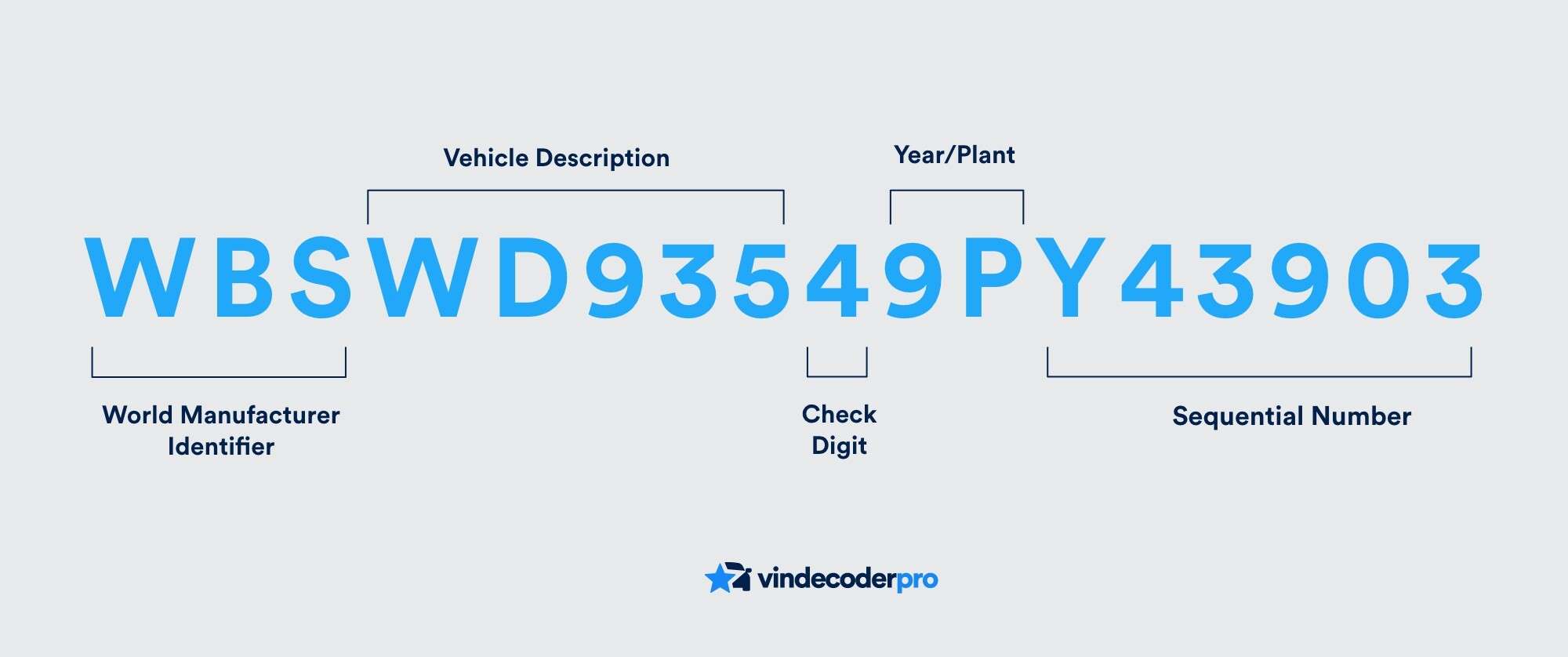
A modern 17-character VIN contains manufacturer and vehicle-identification information. What each position means depends on the format and the manufacturer. Use a suitable decoder and the manufacturer’s information to read it; the characters themselves don’t contain any accident or service history.
Finding the Original Paint Code
The VIN doesn’t always include a paint code. Check the manufacturer’s label or build information, and only use a paint supplier’s lookup if it covers your vehicle. Match the actual paint code before ordering, especially if the car may have been repainted.
Using the Results Before Buying
Compare decoded specifications with the advertisement and vehicle documents. Sort out any mismatches before paying for further checks. A correct VIN result confirms which vehicle you’re looking at, but it says nothing about ownership or mechanical condition.
What a History Report Cannot Confirm
A report can only include what its sources have on record. Unrecorded repairs, accidents and maintenance may be missing. Ask the seller for supporting documents and get an inspection even if the report shows nothing negative.
A Practical Checking Sequence
When navigating the used car market, first make sure the VIN on the car matches the documents, then check its specs. Go through the available history records and raise any inconsistencies with the seller before booking an independent inspection.
Keep copies of the reports and documents you use. They help you compare claims, keep track of questions for the seller and see which parts of the vehicle’s history are still unclear.
Use decoding as one part of your checks, alongside service records, ownership documents and the vehicle’s actual condition.